Master the craft first, then let AI run the repetitive work through the Google Ads API.
Every week I see a new promise: plug AI into your Google Ads account and let it run the show. I took the opposite approach. Before handing any task to AI, I made sure I understood it well enough to do it myself.
That is the point of this article. AI does not replace Google Ads expertise. It multiplies it. If you do not know what a healthy CTR looks like in your market, or why a keyword burns budget without converting, AI will only help you make the same mistakes faster.
Once you master the craft, you can build something far more useful than a chatbot: an end-to-end operating system for your account.
📢 Watch the AI-Driven Google Ads Mastery Video
Why do you still need to master Google Ads?
AI is very good at reading data and spotting patterns. It does not know your business. It does not know which leads your sales team actually closes, which products carry the margin, or which campaign exists for a strategic reason the numbers will never show.
To delegate well, you need to know three things:
- What good looks like: the benchmarks for CTR, CPC and cost per conversion in your market.
- Why things happen: how match types, search terms, bids and budget interact.
- What a wrong decision costs: which changes are easy to undo and which can break a campaign.
Without this, you cannot judge what the AI tells you. And if you cannot judge it, you should not delegate it.
What I keep, and what I give to AI
What stays with me
- Strategy and objectives
- Account and campaign structure
- Bidding logic
- Interpreting what a metric really means for the business
What I hand to AI
- Reporting
- Anomaly checks and alerts
- Search-term mining
- Ad copy variations
- Bulk changes, once I approve them
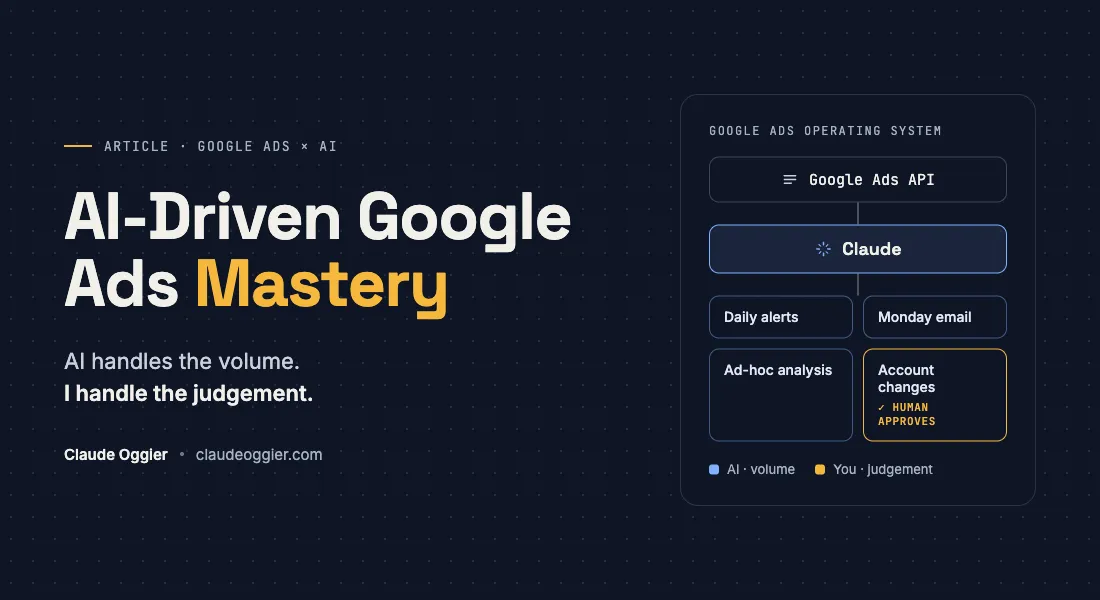
The rule is simple: AI handles the volume, I handle the judgement.
How my Google Ads operating system works
I connected Claude directly to the Google Ads API. No exports, no copy-paste into spreadsheets. The system does three jobs: reporting, ad-hoc analysis and account changes.
- Daily alerts: a script checks the account every day and flags what needs attention.
- Monday email: every Monday morning I receive a summary of the past week.
- Ad-hoc analysis: when I have a question, I ask Claude and it pulls the answer straight from the account.
- Account changes: Claude prepares the changes, I approve them, and they go live.
The scheduled script runs in the cloud, so alerts and reports keep coming even when my Mac is off. The direct Claude connection runs on my Mac, which is where I do analysis and changes.
What the Monday report tells me
The Monday email covers the main KPIs: impressions, clicks, CTR, CPC, cost, conversions and cost per conversion.
More importantly, it tells me where to look:
- Keywords with high cost and no conversions
- New keywords worth adding
I no longer start the week by building a report. I start it by deciding what to do.
What this means for you
If you manage Google Ads today, do not start with the AI tool. Start with an honest question: could I do this task well myself? If yes, automate it. If not, learn it first.
Then remove the manual work step by step: reporting first, then alerts, then analysis. Account changes come last, with a human approving each one.
I apply the same logic to CRM in Why Am I Still Paying for a CRM?, and to browser work in How to Use Claude in Chrome: 3 Practical Examples. For the bigger picture, read Shifting Marketing from Manual Grid to Amplified Impact.
Let’s look at what you can delegate and what should stay with you.Want to build this for your Google Ads account?
Transcript
Hi fellow marketers, in an AI-driven world that is going faster and faster, I want to highlight that it's still you that needs to master the craft first before using any AI tool to run the repetitive work for you.
In this article, I'm showing you how I built an end-to-end operating system to help me manage a Google Ads account. I connected Claude AI with the Google Ads API through Google Cloud. I was using Claude then to help me generate the daily scripts for my alerts. So I'm generating daily alerts whenever there is something weird happening on the account. I'm receiving a Monday email that tells me about the main KPIs, but also about changes that I should make to the account. But it's still up to the human—up to me—for the judgment. I decide yes or no whether I want to apply these changes to the account or not.
A quick reminder: why do you still need to master Google Ads? AI is really good at data and spotting patterns, but it doesn't know your business. Go through the article and see what should stay with you in terms of strategy, objectives, and the structure of the account, and what you can hand off to AI to generate reports, find anomaly checks, alerts, and so on.
Go through the article, but the key takeaway is that AI, yes, can run Google Ads reporting and analyses, but only after you master the craft. You know what good looks like before you delegate anything to AI, so please keep the judgment. If you want to be a good marketer, the judgment needs to stay with you. Good luck, keep doing the good work that you're doing so far, keep learning about AI, embrace it. And if this resonates with you, please feel free to reach out to me or leave a comment on my website and I'm happy to exchange. See you folks.